
If you are experiencing issues with your Lynham Networks Ubiquiti NTU device, please try the following troubleshooting steps.
Device Overview
 Front view of the Ubiquiti UFiber Loco NTU used for Lynham Networks installations.
 Rear view of the device showing the optical and Ethernet ports.
Checking the Lynham Networks Connection Box
Status Lights Check
- Status lights indicate signal strength as follows:
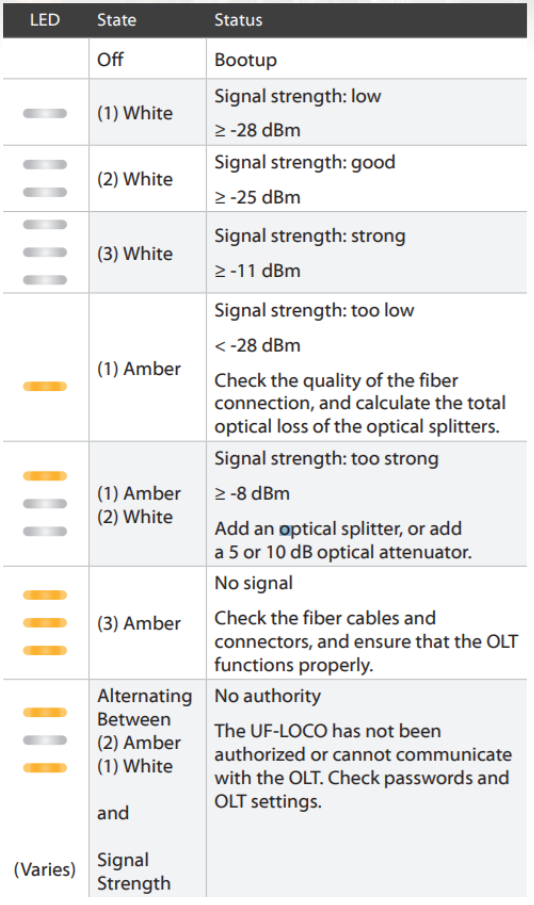 LED indicators showing signal strength on the Ubiquiti UFiber Loco NTU.
Restart
If all of the above lights look correct, try restarting both devices:
- Power off your router and the Lynham Ubiquiti NTU.
- Wait 10 minutes.
- Power both devices back on.
- Wait 5 minutes and re-check the light statuses above.
Still Not Working? Lodge a Support Request
If you're still having issues, please submit a support request by:
- Emailing: support@quokkanet.au
- Calling: 1800 663 977
Please include the following details in your request:
- What type of fault are you experiencing? (e.g. no internet, slow speeds, dropouts)
- Signal light strength (number of bars illuminated)
- Is the Ethernet (LAN) light flashing or solid?
- Have you already tried restarting the device?
