
If you're having trouble with your Adtran ONT (NTU) device, this guide will help you check the lights and reset your equipment before lodging a fault.
Adtran ONT Overview
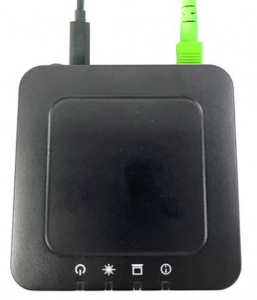 This is the Adtran ONT (Optical Network Terminal) used for your Fibre to the Premise connection.
Power Status Check
 Power light should be solid green during normal operation.
Ensure the device is plugged in and powered on:
- The Power light should be solid green (not flashing).
- Is the ONT plugged into a power point?
- Is there power coming into your property?
Your Adtran ONT may be installed in a cabinet like the one below.
 A typical Lynham Networks installation. Make sure the ONT is plugged in and has power.
Status Lights Check
- Check the ‘OPTICAL’ LED indicator light on the Adtran ONT. It should show a solid green light.
- Check the ‘LAN’ LED indicator light. It should be blinking green.
- Check the ‘ALARM/UPDATE’ LED indicator light. This should be off.
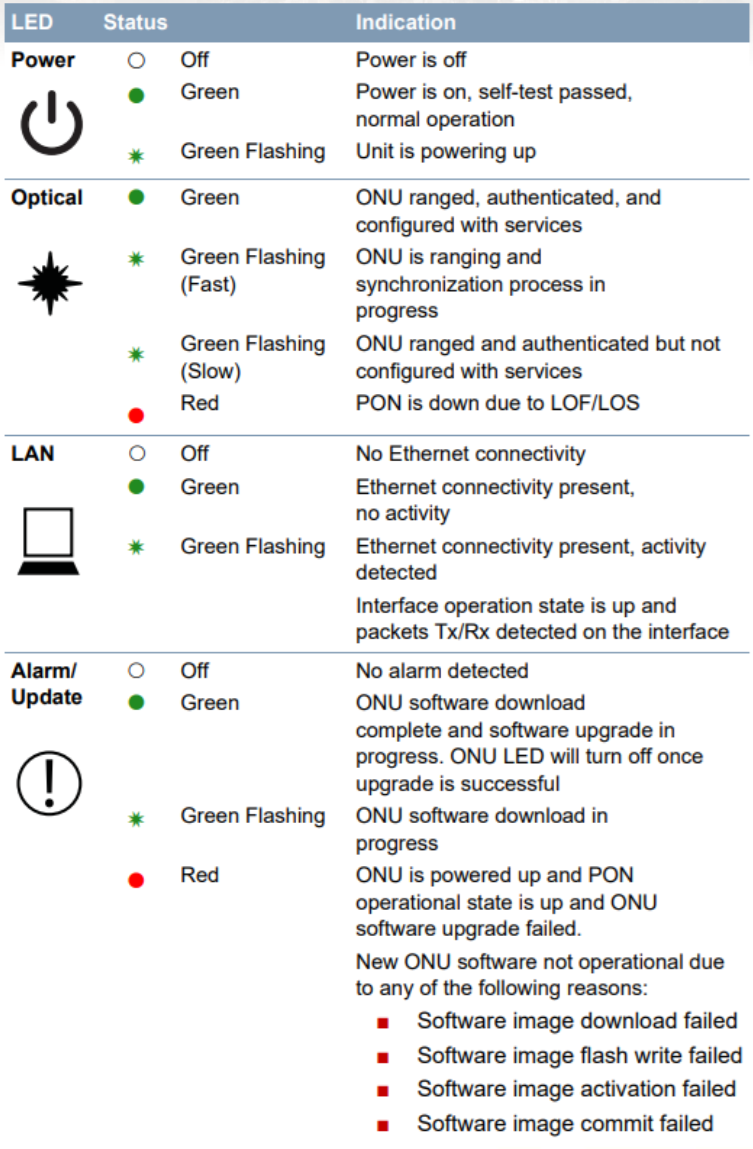 Chart showing the meaning of each LED indicator on the Adtran ONT.
Restart
If all the above look correct, try restarting both devices:
- Power off your router and the Lynham Adtran ONT.
- Wait 10 minutes.
- Power both devices back on.
- Wait 5 minutes and re-check the light statuses above.
Still Not Working? Lodge a Support Request
If you're still having issues, please submit a support request by:
- Emailing: support@quokkanet.au
- Calling: 1800 663 977
Please include the following details in your request:
- What type of fault are you experiencing? (e.g. no internet, slow speeds, dropouts)
- Power light: Colour and status
- Optical light: Colour and status
- LAN light: Colour and status
- Alarm/Update light: Colour and status
